Drawing revisions, RFIs, change orders, purchase orders — flowing through one platform built for framing contractors. So the business stops depending on your memory, your phone, and your late nights.
Set up on your first call · No contracts · Cancel anytime
Trusted by our industry trade partners






Rev C on site, Rev D in your inbox. Lumber orders over the phone. Extras framed and forgotten.
You didn’t start a framing company to shuffle paper. BuildBox puts it all in one place.
Your money, your jobs, and your people — connected, so a decision made in one place shows up everywhere it matters.
Lumber prices move, labour runs long, and by the time the books close the crew is three jobs down the road. BuildBox tracks your revenue, profit, and overhead against real targets as the work happens, so you know whether a job is making money while your crew is still standing on it.
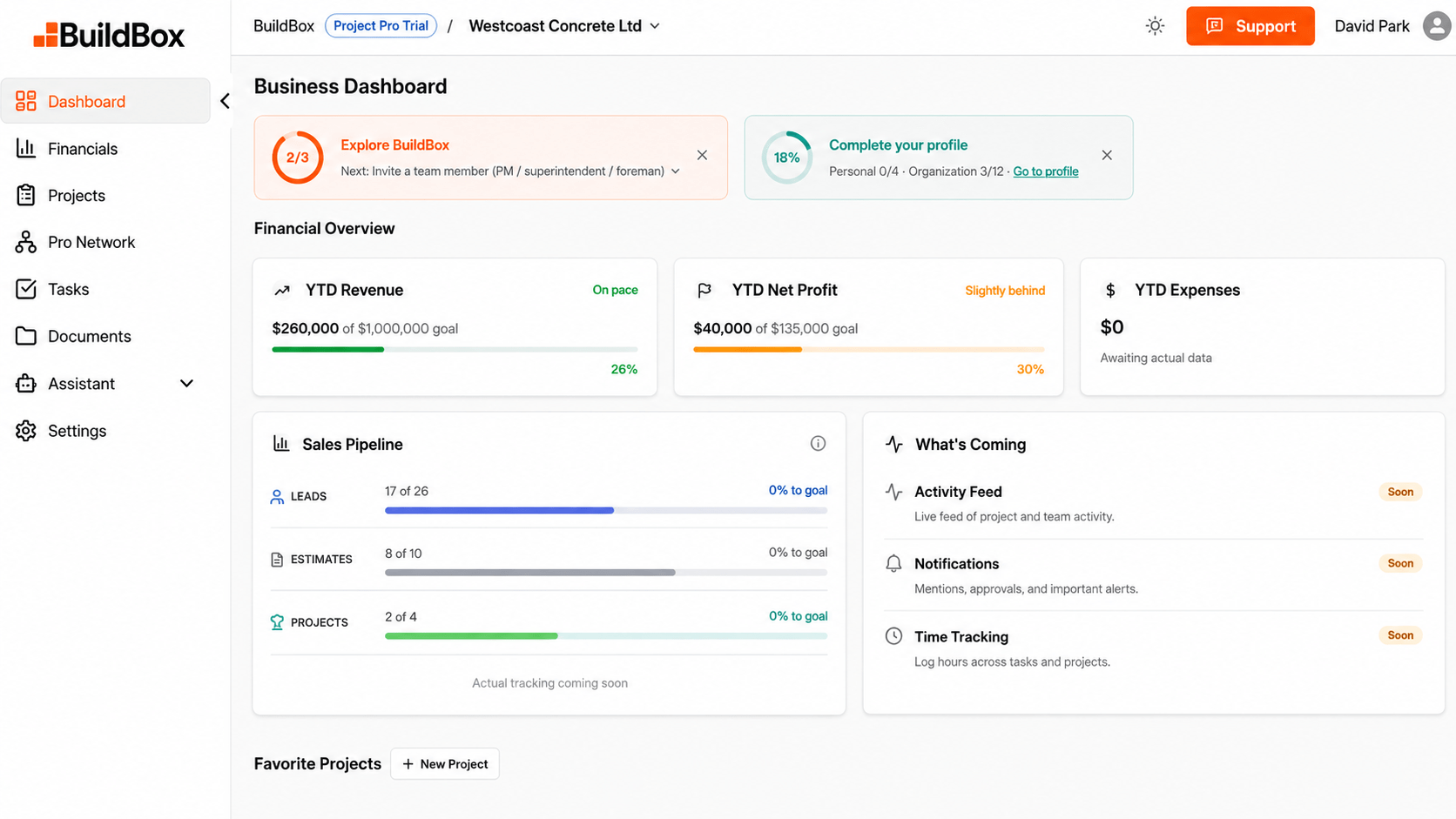
See it in a demoOne screen that shows the financial health of your business. Revenue, profit, and targets rolled up into a single view — no digging through spreadsheets, no chasing your bookkeeper.
Set revenue and profit targets at any time of year. BuildBox tracks your actuals against them, so you know if you’re ahead, behind, or on pace — instead of finding out at tax time.
See revenue and profit in real time, tracked against your targets. Know where the business stands each month — not after year end.
Budget your fixed costs — trucks, insurance, office, salaries — and see how much your projects need to generate to cover them. Project profit means nothing if overhead eats it first.
A full financial model with P&L forecasting, so you know where the business is headed — not just where the projects are.
Every builder hands you drawings a different way — and half the disputes start with a crew framing off the wrong revision. BuildBox gives you your own system: the current set, the RFIs, and the paper trail on every job, no matter which GC is running it.
See it in a demoA live overview of every active project in one place. Check on all your jobs at a glance without opening each one individually.
Upload project drawings so your field team always builds from the most recent set. No more emailing PDFs back and forth or working off outdated sheets.
Create, send, and track RFIs in a structured, professional format — with a fully exportable log that keeps a paper trail on every question sent to the project team.
Build and track Change Orders so you never miss an extra. Every detail logged and exportable — helping you get paid for all the additional work you’re asked to do on site.
Issue and track POs directly in BuildBox. Keep commitments organized with a record of what you’ve ordered, from who, and at what cost.
Manage your submittal register and track submission and approval status — with an exportable log for GC coordination and your own records.
Photo-first deficiency tracking and close-out. Take a picture — Alfred names it, describes it, and logs it for trade completion and GC approval.
Service work or maintenance that doesn’t need drawings or specs? Quick Jobs creates a job that’s tracked and accounted for just like your larger projects.
Central storage for contracts, specs, correspondence, photos — everything tied to a job. No more hunting through email or shared drives.
Your lead hand needs the revised layout, the builder wants a schedule update, and both of them call you. BuildBox gives your crews and office a shared system, so the site keeps moving even when you’re not standing on it.
See it in a demoCreate, track, and assign tasks per project — and see everything you own across all projects in My Tasks. Everyone knows what they’re responsible for and when it’s due.
Daily site reports that replace paper logs and end-of-day text threads. Site activity, crew info, and progress — captured on every project, every day.
Your built-in AI assistant. Ask about your projects, draft RFIs, query the Code. Alfred works with your account’s data — the more you use BuildBox, the more useful he becomes.
Real-time alerts when tasks are updated, documents are uploaded, or items need attention — keeping everyone informed without the email bombing.
Alfred is BuildBox’s built-in AI assistant, and he already knows your business — because he works with the data that lives in your account. Every project you run, every document you upload, every task you log makes him sharper.
No long-term contracts. Cancel any time. Pricing in CAD.
5 users included · Additional users $19/mo
For framing contractors running crews across multiple builds who need structure, professional documentation, and financial visibility they can act on. Built for the trades — not adapted from generic software.
Book a DemoMonth-to-month. We’d rather earn your subscription every month than lock you in.
No lengthy implementation. No IT setup. Getting started takes less than 20 minutes.
Jump on a 20-minute call with Brenden. He’ll walk you through the platform, answer your questions, and help you decide if BuildBox is the right fit. No pitch, no pressure — just a walkthrough.
During your onboarding call, you’ll create your first real project together. Upload your drawings, set your financial targets, and invite your team. You’ll leave the call with BuildBox actually running on a live job.
From that point forward, every project runs through one consistent system — your system. Same process, same documentation, same financial visibility, regardless of who the client is.
Can’t find what you’re looking for? Book a demo and ask Brenden directly.
Book a 20-minute demo and we’ll walk through the platform together. No sales pressure — just a clear look at whether BuildBox fits how you run your business.
20 minutes · No commitment · Built for trades